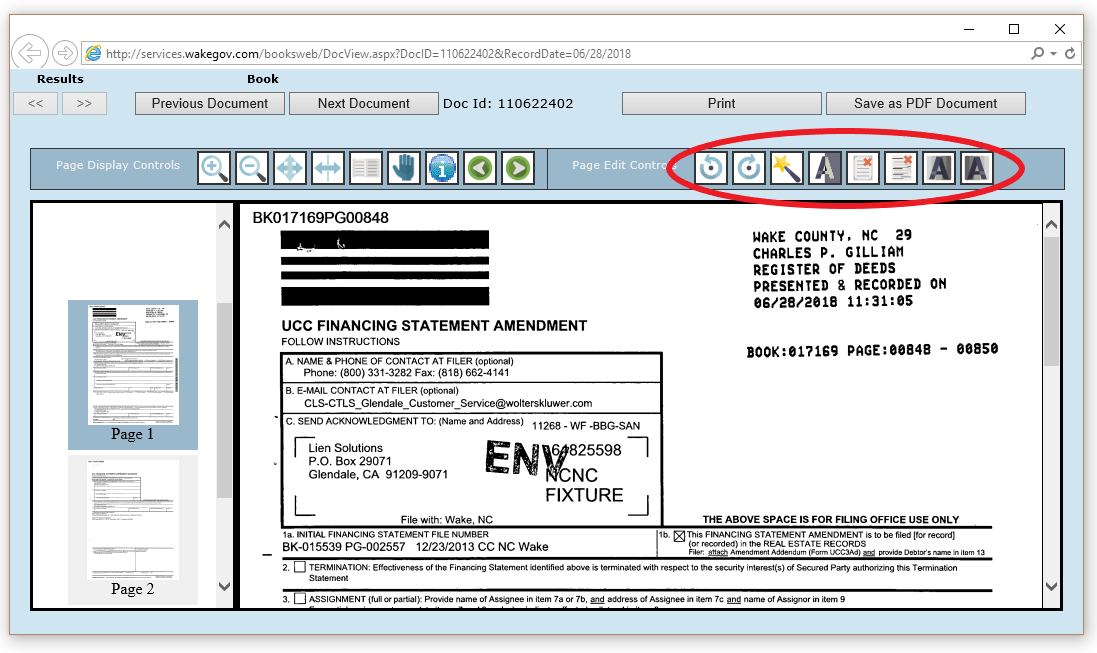
The Consolidated Real Property Index (CRPI) document viewer allows users to enhance the document image for easier viewing.
NOTE: These controls will not permanently affect the document image. Changes made by users will not be applied to printing or saving of the document.
The Page Edit Controls are:
• Rotate Image Counter-Clockwise - allows users to rotate the current document image 90 degrees counter-clockwise
• Rotate Image Clockwise - allows users to rotate the current document image 90 degrees clockwise
• Image Cleanup - allows user to cleanup the document image (despeckle, deskew, etc.)
• Invert Image - allows user to invert the black and white colors. This is mainly used for maps that have been scanned with the colors inverted originally.
• Remove Border - allows user to remove the border around the image
• Remove Horizontal Lines - allows user to remove all horizontal lines on the document image
• Darken Image - allows users to darken the text on the image
• Lighten Image - allows users to lighten the text on the image